Monday, June 27, 2011

Get Email via Sms for FREE!!

Here is a method to get Email via Sms for FREE.It will be very useful when you are out and you expecting a important mail.You need not have GPRS ,any mobile can receive it.There are few ways to do it.
One of the method
is provided by sri ram where we have to create a account in Mail bucket and forward our mails to it.It will create a XML feed which we have to provide in rss field in Google SMS channel.
It was a good tip,but problem was delay in receiving the mail and security vulnerability in creating account in mail bucket.
The more effective way is as follows

My today come to rescue it as introduced this new service.
logo Get Email via Sms for FREE!!
1.visit the site Register your mobile ,you will receive a password which you can use to manage the account.
2.You will be provide with a ID like this
9198XXXXXXXX@m3m.in
For GMAIL account:
3.Now Login to your gmail account
4. Click Settings at the top-right of the page
5. Go to Forwarding and POP/IMAP section
6. Select Forward a copy on incoming mail to and enter you mobile number as 9198XXXXXXXX@m3m.in
7. Select keep Gmail’s copy in the Inbox – so that you can refer to your full e-mail in your Gmail itself
8. Click Save changes.
Gmail forward interface Get Email via Sms for FREE!!
For YAHOO! account:
1.Login in to your account
2.Click options a right top corner
3.Click POP Access and Forwarding at the right.
4. Fill up the forwarding field with the m3m.in ID
*Note:Problem with the Yahoo mail is that it does not keep a copy of mail in inbox unlike Gmail.
Feature in this Service :
1.Instant sms receiving .
2.You can set your filters too from our account dashboard so that you avoid certain mail from reaching you.
3.you can REPLY your email from mobile. Send SMS as REPLY MESSAGEID MESSAGE to 575758 and to REPLY ALL, send SMS as REPLYA MESSAGEID MESSAGE to 575758.
4.You can set up don’t disturb option too.
5.No need for smart phone any mobile can receive it .
Few Drawbacks:
1.Can receive only up to 200 chars and Images not supported.
2.100 chars Ad will be appended at the end .
3.For Indian Users only.

Get Free ICC and IPL Live Cricket Score Updates on Your Mobile!

Cricket might be second most world’s popular sport.But in this part of the world it’s considered as a religion and people are too crazy about it.People play it in every nook and corner available.Many kids grow up with the inspiration to become a great cricketer ,such is the craze for cricket.Everyone want themselves to be updated with latest cricket scores on the go.With the introduction of Indian Premier League ,which is a huge hit, people want score updates of even IPL matches apart from International Matches.Many resort to different possible ways to get cricket score updates,Registering for Paid Score Update services provided by network providers,visiting cricket sites to get score updates,call up friends to ask for updates and what not.In this post lets see how to get free cricket score updates on your mobile.I mean literally free.If you are a cricket fan yourself then this post is for you.Although there are other working methods to get free cricket scores on mobile they have their own drawbacks for example one such method is subscribing to Free Google SMS Cricket Score Updates Channel.Though it actually works few problems are the score updates are not instant, there is a long delay in getting updates on your mobile.There is no point in getting score updates after the match is over.It is not automated you will get updates only if owner of the channel updates the score.Another service was MyToday which seems to have stopped working and is converted into paid version.So lets see a better alternative Free Cricket Score Update Service that answers these problems and provides you Free Live Score Updates on Mobile.

How to Get Free Cricket Score Updates on Mobile?

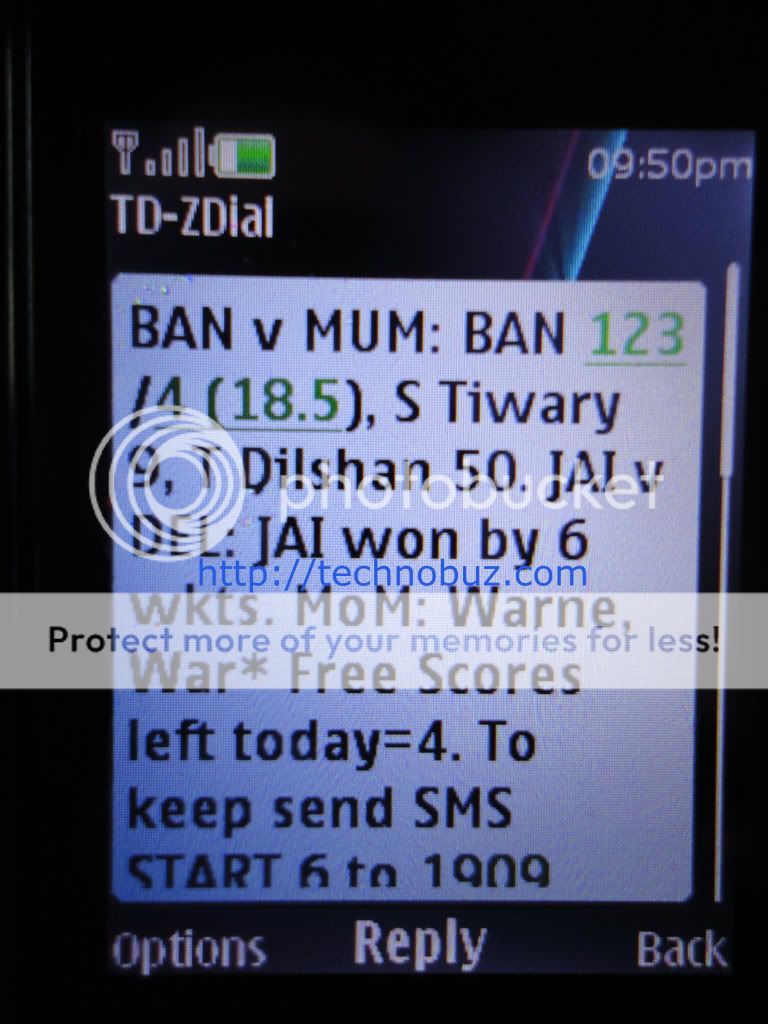
The service that lets you get free cricket score updates on your mobile via SMS is ZipDial. To get free cricket score alerts on your mobile all you need to do is dial
08030050055
It’s a TOLL FREE number. After calling the number you will get a ring after which call will disconnect automatically.Now in few seconds you will get the Live Score of the current ongoing cricket match.

Features of this Free Cricket Score Alert Service:

1. It’s literally FREE.There are no catches.No initial subscription charges.
2. Available to International Users.
3. Score updates are instant and precise.
4. Get score updates for both ICC and IPL Cricket Matches.

Limitations:

1. Free Cricket Score Updates Up to 5 SMS per day for India matches and 3 SMS per day for Non-India matches.
2. After 5 times Usage you will not receive any updates.

Screenshot:

freecricketscoresonmobile Get Free ICC and IPL Live Cricket Score Updates on Your Mobile!
I strongly feel this is one of the few working services that lets you get cricket score updates on your mobile through SMS for FREE.It’s indeed a innovative concept deployed by ZipDial.Do share with your cricket crazy friends and help them save few bucks icon smile Get Free ICC and IPL Live Cricket Score Updates on Your Mobile! And if you know any other service to get free cricket score updates on mobile do share with us!

How to Get Call from Your Own Mobile Number on Airtel

Long back we saw an article on how to make your friends get call from their own mobile number which got a great response from many.Though we were the one who posted it first on the web there were many forums and blogs rewriting the post and claiming that they found it icon smile How to Get Call from Your Own Mobile Number on Airtel But sadly that trick to get call from your own mobile number seemed to have stopped working.In this post lets see an alternative to it.But it’s bit restrictive, works only on Airtel Mobile Network whereas the old trick seemed to work universally in all types of network.Nevertheless it’s another working trick to prank and fool your friends making them get call from their own number.

How to get call from your own mobile number?

All you need to do is key in
*140*6575#
on your mobile and call.You will get a message saying ” Request in progress,please wait“.Now wait for few seconds,you will get a call from your own mobile number.This trick can be used to find your own mobile number in case you don’t know it.It also comes in useful say when you have bought a new SIM or forgot your mobile number.
Use this trick to prank your friends too!
When they are away you can dial in the number *140*6575# and call.Mean while when the request is getting processed you can silently leave the place.Once your friend comes back they are sure to get pranked and confused.It’s an added advantage that the number you used to play this prank does not gets logged in Dialled Numbers Logs.Awesome isn’t? icon smile How to Get Call from Your Own Mobile Number on Airtel
So start pranking your friends as well as enemies.I am sure anyone would get confused when they see their own number flashing on their mobile screen.Also do share with us if it worked for you.

How to View and Save Your Facebook Chat History

It’s true that Facebook has become an integral part of your daily digital life.We share everything from personal to professional.Among many features of Facebook ,Facebook chat is one of our favorite.Sometimes you might want to refer to your old conversation with your friend to get hold of useful info or a link or email id etc., that your friend might have shared.Famous Google Chat has feature which logs your chat with you friends which you can refer anytime in the future.In past we have also seen How to view and save chat history in yahoo messenger.If you were wondering is it possible to view or save your Facebook chat history then this post will give you the answer.Let’s see various ways to view/see and save your Facebook chat history.

How to See/view, Save your Facebook Chat History?

1.Using inbuilt Facebook Feature to view Chat History:
This feature eliminates the need for any third-party app to view your Facebook Chat History.Facebook logs all of your chat history under Facebook Messages along with your message,texts and Emails.
How to View your Facebook Chat History:
1.To to Facebook Messages
2.Click on your friends name.You will be able to find the chat history.
Note:On the right you will be able to find dates which will help you narrow down the search.
How to Save your Facebook Chat History:
1.After finding your Facebook chat history using the above steps.Click on Actions button on top.
2.Select Archive.Or simply save that page using your browser, File->Save Page As.
viewfacebookchathistory How to View and Save Your Facebook Chat History
2.Using Add-ons to View and Save Facebook Chat History:
For Firefox User: Use Facebook Chat History Manager to view and save your chat history with friends on Facebook.
savefacebookchat How to View and Save Your Facebook Chat History
How to use Facebook Chat History Manager to View and Save Facebook Chat History:
1.Login to Facebook.Click Tools-> Facebook Chat History Manager->Create Account.
2.You will see a message “You may now close this window and return to the application“.Now click Close login window button.
3.Now in create account window, enter password and click create.
4.Now click Tools-> Facebook Chat History Manager->View History to view Facebook chat history.To Save Facebook chat history to local disk click Tools-> Facebook Chat History Manager->Export History.
For Chorme User: Use Facebook Chat Archive which lets you view,save and download Facebook chat history in Chrome Browser.
3.Using JavaScript to View Facebook Chat History:
1.Login to Facebook Account.Go to your friends profile and copy their Profile URL from Address Bar.
Eg: https://www.facebook.com/profile.php?id=566750722
You will need their Profile id in this case it’s 566750722.In case your friend as registered for username his/her Facebook profile url will look like https://www.facebook.com/technobuz .In that case here’s how to find out their Facebook profile id.
1.1 Go to any of the picture uploaded by your friend and then go to their Album.
1.2 Now in Facebook Album url at end you can find their Facebook Profile ID.
Eg: https://www.facebook.com/media/albums/?id=566750722
2.Now copy ,paste below code in address bar and hit enter.

javascript:Chat.openTab(profileID);
Eg:
javascript:Chat.openTab(566750722);
3.Now you will be able to see the chat history with that friend !
So, which method to view and save Facebook chat history was easier to you, which method worked out for you?Do share it with us !

How to Control your computer without touching it!

How it would be to control your computer without touching it,moving the mouse just by moving your hands,playing games without touching keyboard or mouse? painting or editing pictures without touching mouse!?
To experience this all you need is a Webcam and following free software.
Experience virtual reality
1.Camspace
camtraxsplash2 How to Control your computer without  touching it!
Features:
-Control mouse via Webcam
-Play our favorite games without even touching mouse ,joystick or keyboard
Demo video:
Playing NFS pro street using Camspace:

This application is sure to make you go mad:)
2.Touchless SDK
Its a open source project featured in microsoft open source community (Codeplex)
Entire source codes are available.
Demo video:

List of Run Commands/Shortcuts for Microsoft Software Applications

List of Run Commands/Shortcuts for Microsoft Applications

Microsoft Office Suite

Run command/shortcut for Microsft Word – winword

Run command/shortcut for Microsoft Excel – excel

Run command/shortcut for Microsoft Powerpoint – powerpnt

Run command/shortcut for Microsoft Outlook – outlook

Run command/shortcut for Microsoft Access – access

Run command/shortcut for Microsoft Frontpage – frontpg

Run command/shortcut for Microsoft Infopath- infopath.exe

Editors/Utilities

Run command/shortcut for Notepad - notepad

Run command/shortcut for Calculator - calc

Run command/shortcut for Wordpad - worpad / write

Run command/shortcut for Paint - mspaint

Entertainment

Run command/shortcut for Windows Movie Maker - moviemk

Run command/shortcut for Windows Media Player - wmplayer

Communication and Web

Run command/shortcut for Internet Explorer - IEXPLORE

Run command/shortcut for Windows Messenger - msmsgs

Run command/shortcut for Windows Communicator - communicator

Run command/shortcut for Windows Netmeeting - conf

Run command/shortcut for Hyperterminal - hypertrm


How to Stop a Youtube Video from Loading

This is a short post that lets you know how to stop youtube videos from loading/buffering.Youtube is one of the most popular video streaming site,hosting billions of videos.Most of us hit youtube at least once a day to watch our favorite videos.Sometimes you might start seeing a video with hope its going to be good but it might turn out to be just another crap or a boring video. You might wish to stop video from loading,but even if you try pausing the video it keeps buffering.I tried hitting ESC key yet seems to keep loading.Also there might be a situation where more than one youtube videos embedded in a page and you have accidentally played the wrong video but you want to stop that video from loading but also want to see other youtube video that are there in the same page.Even Youtube Auto Play option does push us to stop video from loading.In situations like this it’s best to know how to stop a youtube video from loading.So lets see how to stop a youtube video from loading/buffering.


Stopping a Youtube video from buffering:


1.Right Click on the Youtube Video.
2.Click Stop Download.
This will stop a youtube video from buffering/loading.